How we are making PDFs Accessible at Scale through Our Collaboration with Chax
If you work in accessibility in higher education (or any large organisation), you’ll know the truth: PDFs are where accessibility gets complicated.
Web pages can be structured, templated, and governed. PDFs?… They’re often created by dozens of people across departments, exported from different systems, and uploaded over years without anyone tracking whether they’re readable for everyone.
We are really excited to share a collaboration we’ve been building with Chax a specialist team in digital document accessibility and remediation.
Together, we’ve brought a new capability into the Little Forest workflow: AI-assisted PDF remediation, designed for the reality of huge web estates and massive document libraries.

The problem: PDFs can be invisible to screen readers
In practice, many PDFs start off effectively “low accessibility” because they’re untagged or unstructured. A surprising number of PDFs fail basic accessibility requirements. Some are untagged (no structure), some are essentially images of text, and many have:
- No heading structure
- No logical reading order
- Missing document language/title metadata
- Inaccessible tables
- Images with no alternative text
For a screen reader user, that usually means interpreting a PDF is confusing, or worse; completely unusable.
In universities, this problem multiplies exponentially. Institutions often host thousands (or millions) of PDFs, from administrative documents to course materials and research outputs. When that content isn’t accessible, it becomes not simply a compliance risk but a real barrier to learning and participation.

The Long Road to Remediation – When Accessibility is done by Hand
Traditional PDF remediation is extremely time-consuming. Making a PDF accessible usually means tagging it, which consists of adding the structural “scaffolding” that assistive technologies rely on, similar to semantic structure in HTML. Starting with a well-structured source document can certainly make remediation easier, but importantly in practice, many content creators lack the time, training, or specialist knowledge to do this consistently at scale.
So with PDFs, this work can be slow and specialised, such as:
- Identifying and tagging headings correctly
- Setting reading order (especially in multi-column layouts)
- Writing accurate alt text for complex diagrams or graphs
- Making tables readable to assistive tech
- Setting document title and language
- Checking for remaining issues that require human judgement
On a long or complex document, that’s easily hours of work (sometimes days…) especially when subject matter expertise is needed to describe technical content accurately.
What we built with Chax: AI-assisted remediation + a real workflow
This is where our collaboration with Chax comes in. Chax brings deep expertise in document remediation and what “good” looks like in real-world PDFs.
Meanwhile, we at Little Forest bring web-estate scale, discovery, and workflow management.
The result is a new workflow that can take a PDF and within minutes:
- tag document structure (headings, sections, hierarchy)
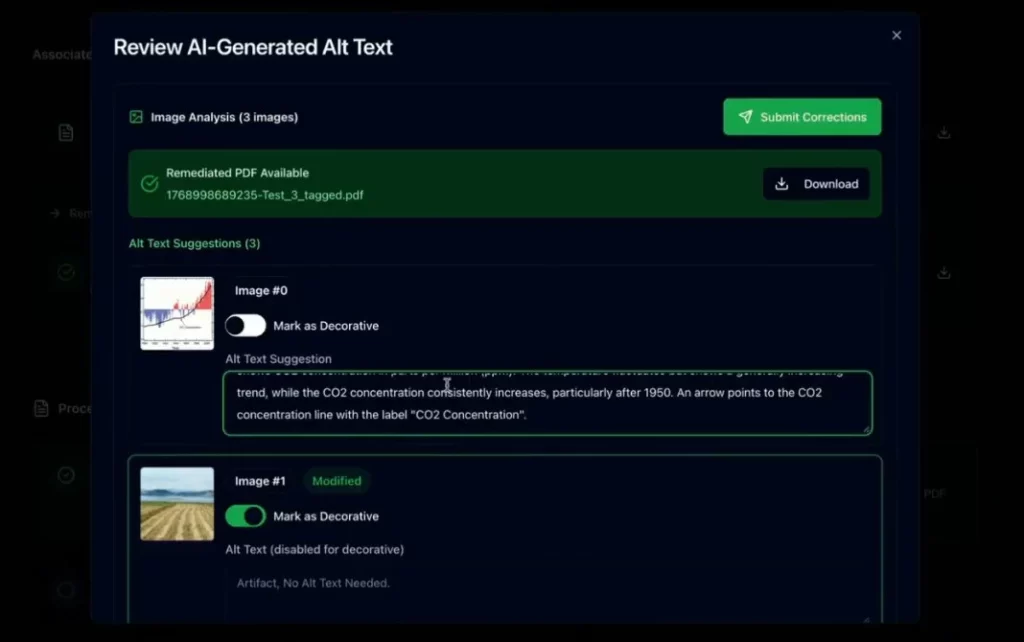
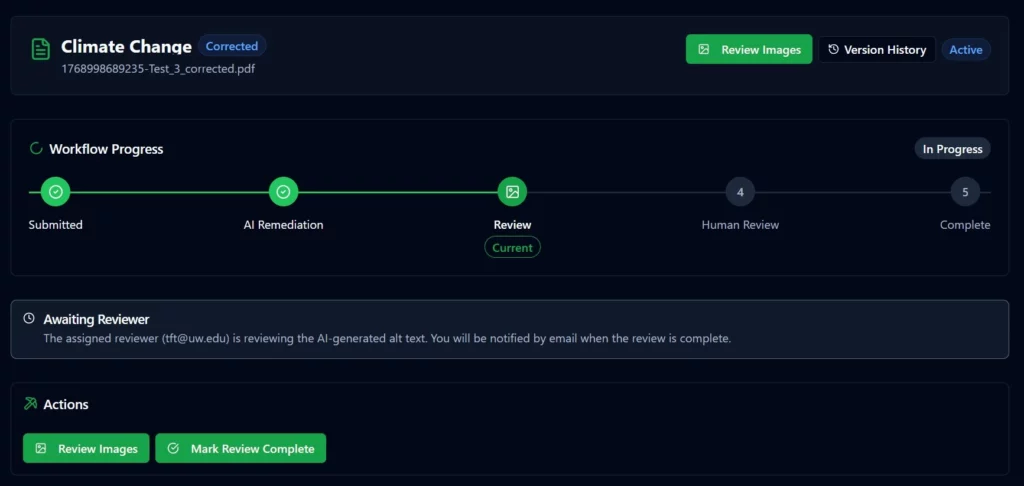
- detect images and generate draft alt text (with a human review step)
- set reading order and flag complex layouts that may need manual checking
- apply key metadata like document title and language
- improve table accessibility
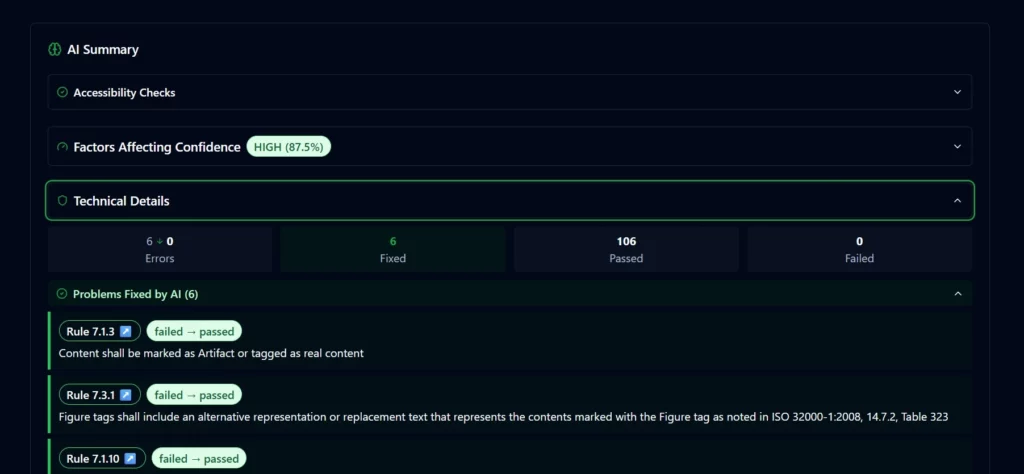
- generate a downloadable remediated PDF output
This isn’t “push a button and forget it.” We have built this new feature to fit how accessibility teams actually work (since we know a thing or two about that) – with review, accountability, and clear next steps.
Review and Relay: Handing PDFs Between Experts and Accessibility Teams
A big focus for us was making this usable for central teams rather than another tool someone has to babysit.
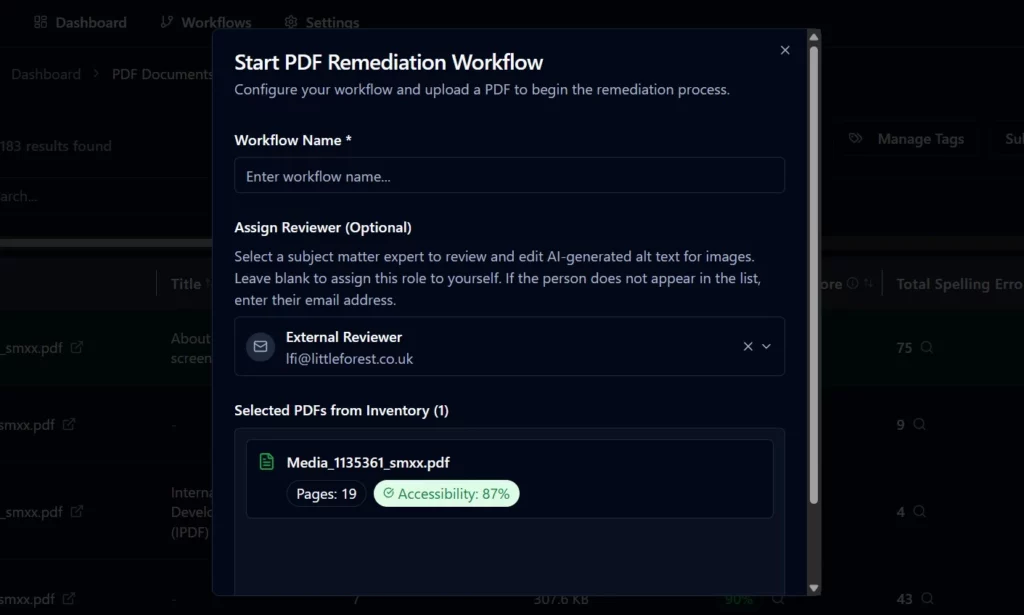
In the workflow you can:
- Choose a reviewer (e.g. a subject matter expert) to verify image descriptions
- Mark images as decorative when appropriate
- Edit alt text and submit corrections to regenerate the document
- See a summary of what’s been fixed and what still needs attention
- Send the job onward for a final review by your accessibility team
- Track the status so everyone stays aligned (no chasing email threads!)
In other words: it supports the reality that true compliance often needs a human pass while removing the biggest chunk of manual effort up front.
Scaling it up: remediation across a whole web estate
Because Little Forest discovers PDFs across your web estate, this workflow isn’t limited to one-off documents. Managing document sprawl without losing your mind is made easier through our new feature.
AI-assisted remediation can often take a document from a very weak baseline to a strong starting point by introducing structure, tagging, and essential metadata; from there clearly highlighting what still needs manual attention (multi-column reading order is a common example).
This tool substantially aids in the difference between “impossible at scale” to “achievable with a sensible process.”
Your teams can:
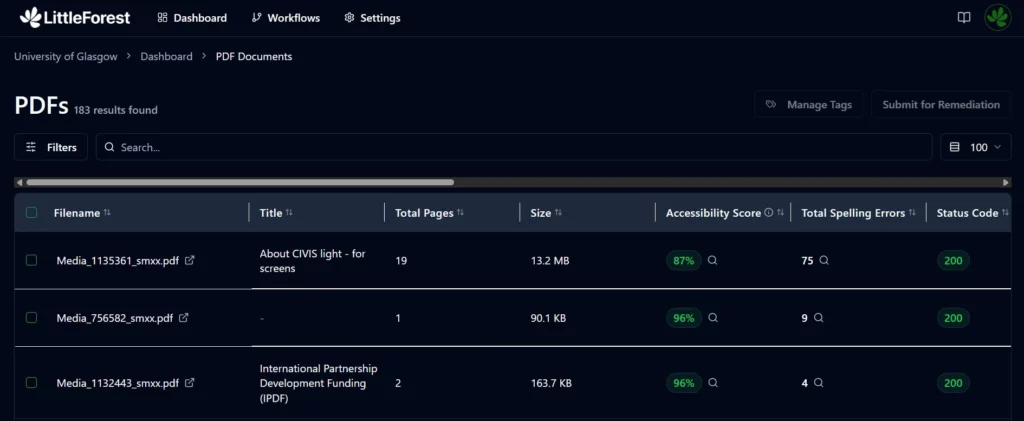
- View all PDFs found across the estate
- Filter by size, page count, accessibility score, author/producer metadata
- Select smaller “quick win” documents first
- Or provide a folder of hundreds/thousands of PDFs for bulk processing support
While improving source document practices is always encouraged, large organisations rarely have the consistency or capacity to rely on this alone; which is why automated support becomes so valuable at web-estate scale.
This is especially relevant for universities, where document sprawl is common and legacy content is part of daily life.
Better Together: Accessibility Meets Automation
Chax’s work is grounded in what matters most: real people being able to access information independently, not just ticking a technical box.
By combining that expertise with Little Forest’s estate-level governance and workflow capability, we’re aiming to make PDF remediationfaster, more consistent, easier to manage as a team, and far more realistic at scale. Through teamwork and collaboration, like people and AI, we can build something greater than just a feature.
Want to see it in action?
If PDFs are a pain point in your organisation, whether it’s course content, policy documents, reports, or legacy files, we’d love to show you how this workflow can help.
Get in touch and we can walk through the process, discuss your document volume, and explore what “accessible at scale” could look like for your team.
📩 Email: [email protected]